
Contents
- CBS scan
- CBS channel management
- CBS dwell split time synchronization
- Configure CBS
- cfg80211tool wifiX cbs_bkscanen 1/0
- cfg80211tool wifiX cbs_resttime
- cfg80211tool wifiX cbs_dwellrest
- cfg80211tool wifiX cbs_waittime
- cfg80211tool wifiX cbs_dwellspt
, value can be 25, 50, 75 - wifitool athX setchanlist ch1 ch2 …n
CBS scan
下图使用50ms 作为分割停留时间并显示如何检测 200 ms 信标AP的间隔,扫描停留时间为200ms,这是通过分割扫描来完成同一通道上的多次扫描。 基本思想是等待两次信标间隔,因此看到的概率很高(典型的信标配置为100ms,但现实生活中的场景可能会有所不同)
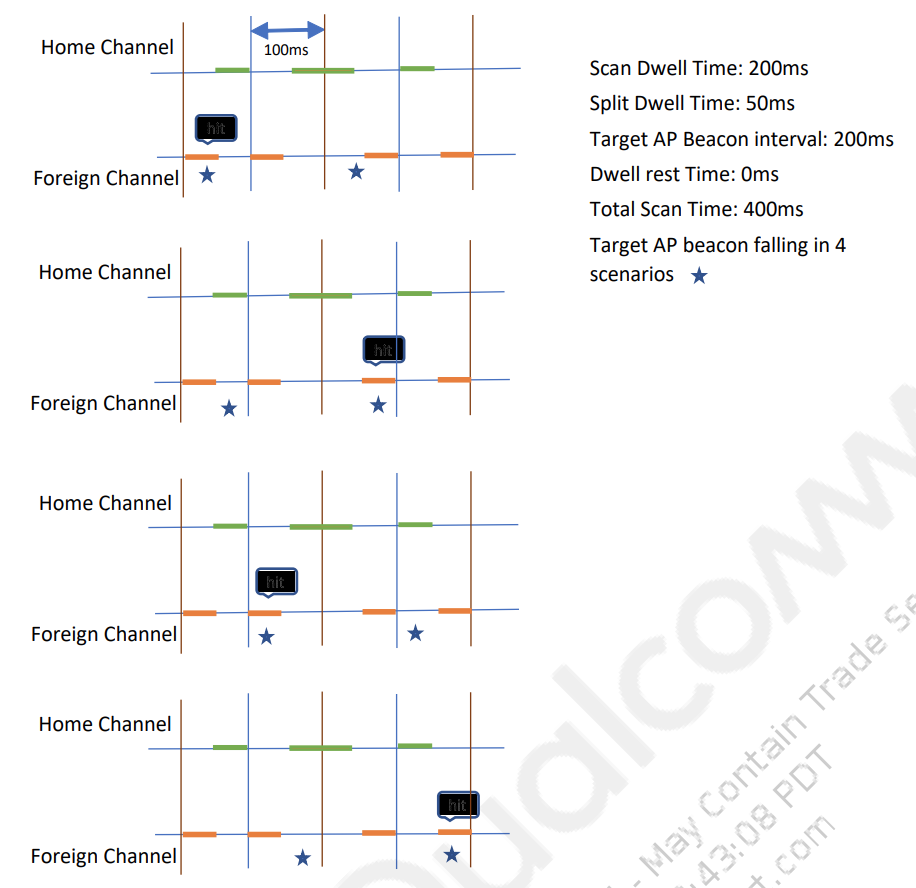
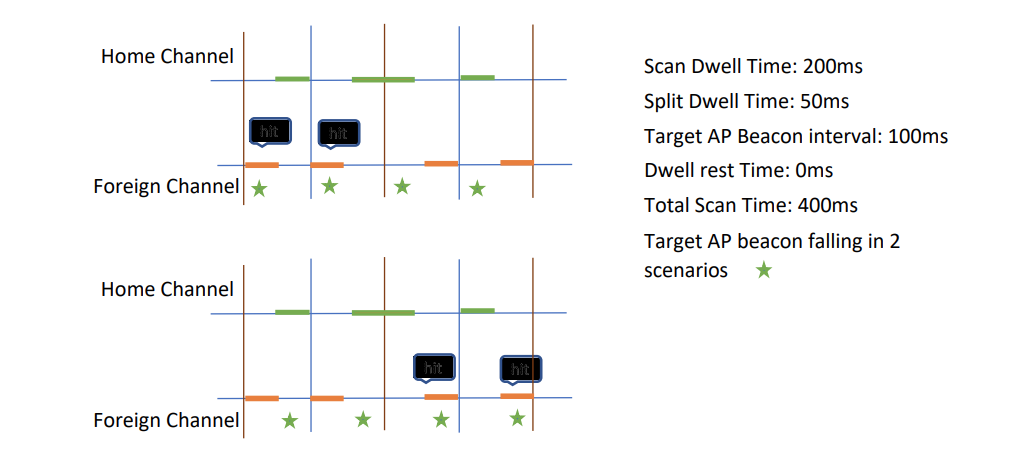
下图使用50ms作为分割驻留时间,展示了如何检测100ms信标扫描停留时间为200ms的AP间隔,这是通过将扫描分割来完成的同一通道上的多次扫描。
CBS channel management
CBS 实现了一个新的扫描状态机来根据需要调整所有参数。 它还设置了ACS,这样在扫描之后,ACS就有了选择最佳通道的所有数据。 以下参数由 CBS 为每个频道管理:
- 停留分割时间—这是给定扫描命令在外部通道上的停留时间。
- 停留休息时间—在同一位置上发出下一次连续扫描之前的最短休息时间渠道。
- 休息时间—不同通道上的扫描之间的时间间隔。
- 频道列表—要扫描的频道列表。
- 等待时间—扫描所有频道后重新开始之前的等待时间。
为了对这些参数进行根深蒂固的控制,CBS 一次仅针对一个频道进行扫描。这种行为使得 CBS 能够自行管理这些参数,而不是依赖于 FW。
CBS dwell split time synchronization
为了完成完整停留时间(例如 200 毫秒)的扫描,CBS 在同一通道,停留时间短。 这些多个扫描命令、扫描变得至关重要每次扫描时光谱的不同部分。 这种现象是通过传递一个新的扫描命令参数如下:
typedef struct { /** Scan ID */ A_UINT32 scan_id; /** Scan requestor ID */ : : : A_UINT32 burst_duration; /** host scan start offset from TBTT in usec*/ A_UINT32 scan_start_offset; /** * TLV (tag length value ) paramerters follow the scan_cmd structure. * TLV can contain channel list, bssid list, ssid list and * ie. the TLV tags are defined above; */} wmi_start_scan_cmd;TBTT synchronized scan TBTT同步扫描 ‘Scan start offset’参数允许固件使用 TBTT 作为扫描命令的时间 根据扫描开始偏移取决于分割时间和休息时间; 这是主机指示的值FW获取滑动。 CBS SM向该参数发送不同的值,以便FW可以根据需要开始扫描以覆盖光谱。
根据配置的停留分割时间和停留休息时间,“扫描开始偏移”值是预先确定并在扫描期间使用。
Configure CBS
Enter the following commands to configure CBS:
- Command to enable/disable CBS (background scan).
cfg80211tool wifiX cbs_bkscanen 1/0
- Command to modify scan rest interval (msec). The default value is 500 ms. If a user attempts to change rest time while CBS is running, the scan is canceled, rest time is changed and the scan is restarted.
cfg80211tool wifiX cbs_resttime
- Command to modify dwell rest time (msec), that is, the time between scans on same channel with different scan offset. The default value is 100 ms. Dwell rest times can be only integral multiples of 100 ms (beacon interval). If a non-integral multiple of beacon interval is passed it is adjusted to next multiple of the beacon interval. The default value is set to be 100 ms. Also100 ms is the least value we can set. If a user tries to change dwell rest time, while CBS is running, the scan is canceled, dwell rest is changed and then the scan is restarted.
cfg80211tool wifiX cbs_dwellrest
- Command to modify wait time (msec), that is, the time to wait after all channels are scanned and before starting a new scan. Set this to 0 to stop after one complete scan. The default value is 1000 ms. Wait time can only be integral multiples of 100 ms (beacon interval). If given number is not an integral multiple of the beacon interval, it is adjusted to next multiple of the beacon interval. If configured to 0, the scan is done on all channels in the channel list once and stopped. If a user attempts to change wait time while CBS is running, the scan is canceled, the wait time is changed and the scan is restarted.
cfg80211tool wifiX cbs_waittime
- Command to configure the dwell split time. This is command can be used to test different scan offset passed to FW. The default value is 50 ms. Returns an error if we set to any other value. If a user attempts to change dwell split time while CBS is running, the scan is canceled, split time is changed and the scan is restarted.
cfg80211tool wifiX cbs_dwellspt , value can be 25, 50, 75
- Command to set user desired channel list to scan.